<?xml version="1.0" encoding="UTF-8"?><rss version="2.0"
	xmlns:content="http://purl.org/rss/1.0/modules/content/"
	xmlns:wfw="http://wellformedweb.org/CommentAPI/"
	xmlns:dc="http://purl.org/dc/elements/1.1/"
	xmlns:atom="http://www.w3.org/2005/Atom"
	xmlns:sy="http://purl.org/rss/1.0/modules/syndication/"
	xmlns:slash="http://purl.org/rss/1.0/modules/slash/"
	>

<channel>
	<title>楽天ドライブ &#8211; 楽天モバイル従業員紹介キャンペーン｜最大14000P獲得方法を現役楽天社員が解説</title>
	<atom:link href="https://www.rmobile-evangelist.site/tag/%E6%A5%BD%E5%A4%A9%E3%83%89%E3%83%A9%E3%82%A4%E3%83%96/feed" rel="self" type="application/rss+xml" />
	<link>https://www.rmobile-evangelist.site</link>
	<description></description>
	<lastBuildDate>Mon, 30 Jun 2025 20:12:16 +0000</lastBuildDate>
	<language>ja</language>
	<sy:updatePeriod>
	hourly	</sy:updatePeriod>
	<sy:updateFrequency>
	1	</sy:updateFrequency>
	<generator>https://wordpress.org/?v=6.8.2</generator>

<image>
	<url>https://www.rmobile-evangelist.site/wp-content/uploads/2024/04/cropped-logo_エバンジェリスト-32x32.jpg</url>
	<title>楽天ドライブ &#8211; 楽天モバイル従業員紹介キャンペーン｜最大14000P獲得方法を現役楽天社員が解説</title>
	<link>https://www.rmobile-evangelist.site</link>
	<width>32</width>
	<height>32</height>
</image> 
<atom:link rel="hub" href="https://pubsubhubbub.appspot.com"/><atom:link rel="hub" href="https://pubsubhubbub.superfeedr.com"/><atom:link rel="hub" href="https://websubhub.com/hub"/>	<item>
		<title>クラウドストレージ50GB無料！楽天モバイル契約者向けのRakutenドライブ特典とは</title>
		<link>https://www.rmobile-evangelist.site/rakutendrive/%20</link>
					<comments>https://www.rmobile-evangelist.site/rakutendrive/%20#respond</comments>
		
		<dc:creator><![CDATA[rmobile-evangelist]]></dc:creator>
		<pubDate>Sun, 21 Jul 2024 00:52:48 +0000</pubDate>
				<category><![CDATA[お得]]></category>
		<category><![CDATA[キャンペーン]]></category>
		<category><![CDATA[楽天ドライブ]]></category>
		<guid isPermaLink="false">https://www.rmobile-evangelist.site/?p=1819</guid>

					<description><![CDATA[<p><img src="https://www.rmobile-evangelist.site/wp-content/uploads/2024/07/affingerアイキャッチ-72-1024x538.png" class="webfeedsFeaturedVisual" /></p>楽天モバイル契約者は楽天ドライブのクラウドストレージ50GBを無料で利用可能です。お得な契約特典を活用して、通信費以外も節約しましょう！]]></description>
										<content:encoded><![CDATA[<p><img src="https://www.rmobile-evangelist.site/wp-content/uploads/2024/07/affingerアイキャッチ-72-1024x538.png" class="webfeedsFeaturedVisual" /></p>
<p>この記事では、<strong>楽天の<strong>クラウドストレージサービス</strong></strong>「<strong>RakutenDrive(ラクテンドライブ)</strong>」について解説します。</p>


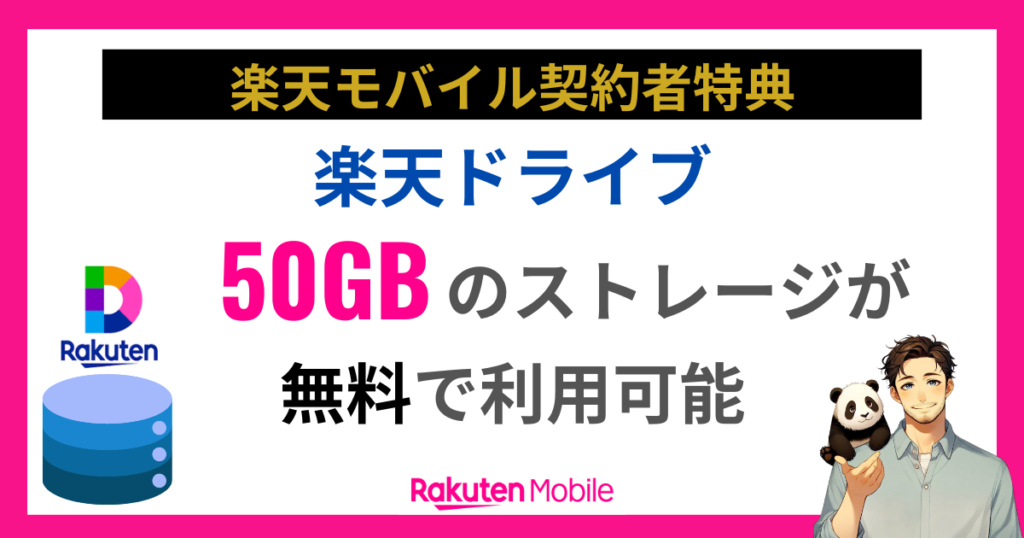
<p>実は、<span class="st-mymarker-s">楽天モバイル契約者なら、楽天ドライブの<span class="hutoaka"><span class="st-mymarker-s"><span class="hutoaka">ストレージ</span></span>50GBを無料</span>で利用できます。</span></p>


<p><span class="st-mymarker-s">楽天モバイルを未契約の方でも、最大10GBまで利用できるので、是非お得にクラウドストレージを利用する方法をチェックしてください。</span></p>


<p>また、楽天モバイルをお得に申し込みする方法も最後に紹介しているので、よろしければご検討ください。</p>


<div class="wp-block-group"><div class="wp-block-group__inner-container is-layout-constrained wp-block-group-is-layout-constrained"><div class="swell-block-balloon"><div class="c-balloon -bln-left" data-col="gray"><div class="c-balloon__icon -circle"><img decoding="async" src="data:image/gif;base64,R0lGODlhAQABAAAAACH5BAEKAAEALAAAAAABAAEAAAICTAEAOw==" data-src="https://www.rmobile-evangelist.site/wp-content/uploads/2024/04/cropped-logo_エバンジェリスト.jpg" alt="" class="lazyload c-balloon__iconImg" width="80px" height="80px"><noscript><img decoding="async" src="https://www.rmobile-evangelist.site/wp-content/uploads/2024/04/cropped-logo_エバンジェリスト.jpg" alt="" class="c-balloon__iconImg" width="80px" height="80px"></noscript><span class="c-balloon__iconName">楽天社員</span></div><div class="c-balloon__body -speaking -border-none"><div class="c-balloon__text">
<p><strong>楽天モバイル従業員紹介キャンペーンエバンジェリスト｜小谷</strong><br>2024年2月から楽天モバイル従業員紹介キャンペーンを案内<img src="https://s.w.org/images/core/emoji/16.0.1/72x72/1f4dd.png" alt="📝" class="wp-smiley" style="height: 1em; max-height: 1em;" /><br>累計7,000回線以上の紹介実績アリで、2024年には三木谷社長から個別で表彰を受けている<img src="https://s.w.org/images/core/emoji/16.0.1/72x72/1f3c5.png" alt="🏅" class="wp-smiley" style="height: 1em; max-height: 1em;" /><br>読者にとってお得で役立つ情報を発信することを心がけています<img src="https://s.w.org/images/core/emoji/16.0.1/72x72/1f4e3.png" alt="📣" class="wp-smiley" style="height: 1em; max-height: 1em;" /></p>
<span class="c-balloon__shapes"><span class="c-balloon__before"></span><span class="c-balloon__after"></span></span></div></div></div></div>


<div class="wp-block-group"><div class="wp-block-group__inner-container is-layout-constrained wp-block-group-is-layout-constrained">
<p class="has-text-align-center"><strong>＼ 1回線につき最大14,000P還元<img src="https://s.w.org/images/core/emoji/16.0.1/72x72/1f381.png" alt="🎁" class="wp-smiley" style="height: 1em; max-height: 1em;" /> ／</strong></p>


<div class="swell-block-button -size-l is-style-btn_solid u-mb-ctrl u-mb-15"><a href="https://bit.ly/42VTtMg" target="_blank" rel="noopener noreferrer" class="swell-block-button__link"><span>楽天モバイル従業員紹介キャンペーン<br>エントリーする</span></a></div>


<div class="wp-block-image animated flash">
<figure class="aligncenter size-full is-resized"><img decoding="async" width="240" height="296" src="https://www.rmobile-evangelist.site/wp-content/uploads/2024/06/undefined-2.png" alt="" class="wp-image-3022" style="width:179px;height:auto"/></figure></div></div></div>
</div></div>
</div></div>


<h2 class="wp-block-heading">楽天ドライブって何？楽天のクラウドストレージサービス</h2>


<figure class="wp-block-image size-large"><img decoding="async" width="1024" height="445" src="https://www.rmobile-evangelist.site/wp-content/uploads/2024/07/image-8-1024x445.jpg" alt="" class="wp-image-1825" srcset="https://www.rmobile-evangelist.site/wp-content/uploads/2024/07/image-8-1024x445.jpg 1024w, https://www.rmobile-evangelist.site/wp-content/uploads/2024/07/image-8-300x131.jpg 300w, https://www.rmobile-evangelist.site/wp-content/uploads/2024/07/image-8-768x334.jpg 768w, https://www.rmobile-evangelist.site/wp-content/uploads/2024/07/image-8.jpg 1200w" sizes="(max-width: 1024px) 100vw, 1024px" /></figure>


<p>楽天ドライブを初めて聞いた人もいるかもしれません。</p>


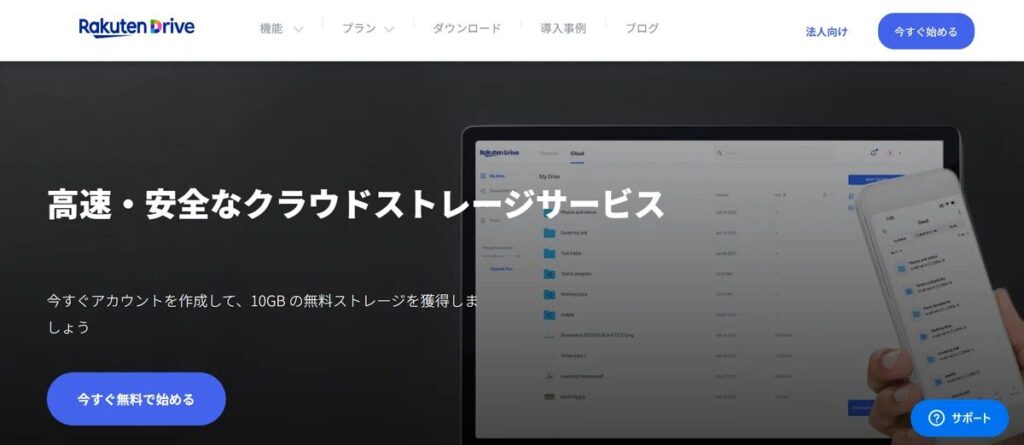
<p>楽天ドライブとは、<span class="st-mymarker-s">オンライン上で全てのデータを安全に保存・管理できるクラウドストレージサービス</span>です。</p>


<p>インターネットに接続できる環境さえあれば、どの場所からでも複数の端末でデータにアクセスできます。</p>


<p>新しいファイルやフォルダをアップロードしたり、保存済みのアイテムをダウンロードすることも可能です。</p>


<p>モバイル端末では「楽天ドライブ」アプリを使用し、ブラウザを通じてWindows、Mac、LinuxのOSをサポートする「rakuten-drive.com」ウェブサイトからクラウドへアクセスできます。</p>


<p>楽天ドライブは個人だけでなく、グループやビジネス向けにも、さまざまなニーズに合わせた有料プランを提供しています。</p>


<figure class="wp-block-flexible-table-block-table"><table class="has-fixed-layout" style="border-collapse:collapse;width:100%;min-width:800px;text-align:center"><thead><tr><th style="padding:10px;border:1px solid #ccc;background-color:var(--color_main);text-align:center">　</th><th style="padding:10px;border:1px solid #ccc;background-color:var(--color_main);text-align:center">楽天ドライブ Free</th><th style="padding:10px;border:1px solid #ccc;background-color:var(--color_main);text-align:center">楽天ドライブ PRO</th><th style="padding:10px;border:1px solid #ccc;background-color:var(--color_main);text-align:center">楽天ドライブ Business</th><th style="padding:10px;border:1px solid #ccc;background-color:var(--color_main);text-align:center">楽天ドライブ Advanced</th></tr></thead><tbody><tr><td style="padding:10px;border:1px solid #ccc;text-align:center">クラウドストレージ</td><td style="padding:10px;border:1px solid #ccc;text-align:center">最大10GB</td><td style="padding:10px;border:1px solid #ccc;text-align:center">1TB</td><td style="padding:10px;border:1px solid #ccc;text-align:center">1名あたり3TB</td><td style="padding:10px;border:1px solid #ccc;text-align:center">統合クラウド15TBから。<br>ライセンス追加ごとに3TB提供</td></tr><tr><td style="padding:10px;border:1px solid #ccc;text-align:center">1回でアップロードできる容量</td><td style="padding:10px;border:1px solid #ccc;text-align:center">10GB</td><td style="padding:10px;border:1px solid #ccc;text-align:center">50GB</td><td style="padding:10px;border:1px solid #ccc;text-align:center">50GB</td><td style="padding:10px;border:1px solid #ccc;text-align:center">100GB</td></tr><tr><td style="padding:10px;border:1px solid #ccc;text-align:center">ユーザー</td><td style="padding:10px;border:1px solid #ccc;text-align:center">1名</td><td style="padding:10px;border:1px solid #ccc;text-align:center">1名</td><td style="padding:10px;border:1px solid #ccc;text-align:center">5名以上</td><td style="padding:10px;border:1px solid #ccc;text-align:center">5名以上</td></tr><tr><td style="padding:10px;border:1px solid #ccc;text-align:center">いつでもどこでもアクセス可能</td><td colspan="4" style="padding:10px;border:1px solid #ccc;text-align:center">○</td></tr><tr><td style="padding:10px;border:1px solid #ccc;text-align:center">簡単で安全な共有</td><td colspan="4" style="padding:10px;border:1px solid #ccc;text-align:center">○</td></tr><tr><td style="padding:10px;border:1px solid #ccc;text-align:center">MS Office文書 編集</td><td colspan="4" style="padding:10px;border:1px solid #ccc;text-align:center">○</td></tr><tr><td style="padding:10px;border:1px solid #ccc;text-align:center">Rakuten Drive Transfer</td><td colspan="4" style="padding:10px;border:1px solid #ccc;text-align:center">○</td></tr><tr><td style="padding:10px;border:1px solid #ccc;text-align:center">AES 256ビット暗号化とTLS暗号化</td><td colspan="4" style="padding:10px;border:1px solid #ccc;text-align:center">○</td></tr><tr><td style="padding:10px;border:1px solid #ccc;text-align:center">各メンバーごとにカスタムストレージ設定</td><td style="padding:10px;border:1px solid #ccc;text-align:center">&#8211;</td><td style="padding:10px;border:1px solid #ccc;text-align:center">&#8211;</td><td style="padding:10px;border:1px solid #ccc;text-align:center">×</td><td style="padding:10px;border:1px solid #ccc;text-align:center">○</td></tr><tr><td style="padding:10px;border:1px solid #ccc;text-align:center">管理コンソール</td><td style="padding:10px;border:1px solid #ccc;text-align:center">&#8211;</td><td style="padding:10px;border:1px solid #ccc;text-align:center">&#8211;</td><td style="padding:10px;border:1px solid #ccc;text-align:center">○</td><td style="padding:10px;border:1px solid #ccc;text-align:center">○</td></tr></tbody></table></figure>


<h3 class="wp-block-heading">RakutenDrive(楽天ドライブ)は「Sendy」が前身</h3>


<figure class="wp-block-image size-full is-resized"><img decoding="async" width="1000" height="176" src="https://www.rmobile-evangelist.site/wp-content/uploads/2024/07/image-9.png" alt="" class="wp-image-1829" style="width:615px;height:auto" srcset="https://www.rmobile-evangelist.site/wp-content/uploads/2024/07/image-9.png 1000w, https://www.rmobile-evangelist.site/wp-content/uploads/2024/07/image-9-300x53.png 300w, https://www.rmobile-evangelist.site/wp-content/uploads/2024/07/image-9-768x135.png 768w" sizes="(max-width: 1000px) 100vw, 1000px" /></figure>


<p>楽天ドライブは韓国・ソウルに拠点を置くイストモブ社が2019年に提供を開始した「<span class="hutoaka">Sendy</span>」というサービスが前身となっていて、楽天モバイル株式会社が2021年にイストモブ社を完全子会社化しました。</p>


<p>その後、2022年には楽天シンフォニー傘下とし法人名を「<strong>Rakuten Symphony Korea, Inc.</strong>」に変更し、現在は「<span class="hutoaka">楽天ドライブ</span>」のサービス名で提供しています。</p>


<h2 class="wp-block-heading">RakutenDrive(楽天ドライブ)の使い方を解説</h2>


<figure class="wp-block-image size-full is-resized"><img decoding="async" width="925" height="363" src="https://www.rmobile-evangelist.site/wp-content/uploads/2024/07/image-11.png" alt="" class="wp-image-1832" style="width:754px;height:auto" srcset="https://www.rmobile-evangelist.site/wp-content/uploads/2024/07/image-11.png 925w, https://www.rmobile-evangelist.site/wp-content/uploads/2024/07/image-11-300x118.png 300w, https://www.rmobile-evangelist.site/wp-content/uploads/2024/07/image-11-768x301.png 768w" sizes="(max-width: 925px) 100vw, 925px" /></figure>


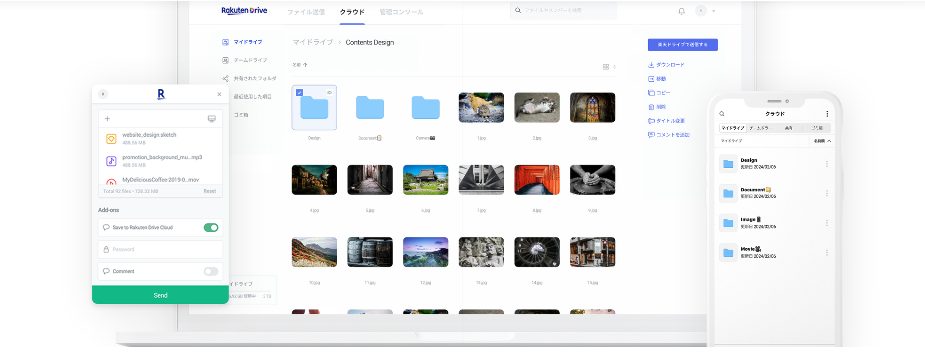
<p>楽天ドライブの利用方法について紹介します。</p>


<p>まずUIはシンプルで、直観的に操作できるような作りになっています。</p>


<figure class="wp-block-image size-large is-style-st-photoline"><img decoding="async" width="1024" height="438" src="https://www.rmobile-evangelist.site/wp-content/uploads/2024/07/image-12-1024x438.png" alt="" class="wp-image-1836" srcset="https://www.rmobile-evangelist.site/wp-content/uploads/2024/07/image-12-1024x438.png 1024w, https://www.rmobile-evangelist.site/wp-content/uploads/2024/07/image-12-300x128.png 300w, https://www.rmobile-evangelist.site/wp-content/uploads/2024/07/image-12-768x328.png 768w, https://www.rmobile-evangelist.site/wp-content/uploads/2024/07/image-12.png 1200w" sizes="(max-width: 1024px) 100vw, 1024px" /></figure>


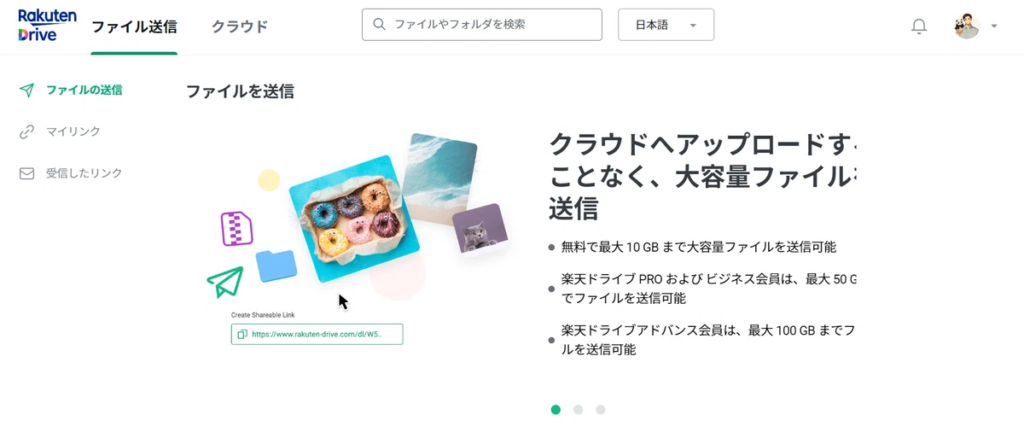
<p>画面上で「ファイル送信」か「クラウド」のタブを選択します。</p>


<p>クラウドはフォルダやファイルを保存する際に利用します。</p>


<h3 class="wp-block-heading">RakutenDrive(楽天ドライブ)はWebとアプリで利用が可能</h3>


<p>楽天ドライブは、<strong>Web</strong>版と<strong>アプリ</strong>版があるので、PC作業とスマホ作業のどちらも問題ありません。</p>


<p>Web版は<a href="https://home.rakuten-drive.com/?lang=ja" target="_blank" rel="noopener nofollow" title="こちら">こちら</a></p>


<p>アプリ版はこちら</p>


<div class="appreach"><img decoding="async" src="https://is1-ssl.mzstatic.com/image/thumb/Purple211/v4/4b/d9/cc/4bd9cc0b-f458-2c0d-be3d-17a8a4ed5e98/AppIcon-New-0-0-1x_U007epad-0-0-85-220.png/512x512bb.jpg" alt="楽天ドライブ - 転送・保存" class="appreach__icon"><div class="appreach__detail"><p class="appreach__name">楽天ドライブ &#8211; 転送・保存</p><p class="appreach__info"><span class="appreach__developper">Rakuten Symphony Korea, Inc.</span><span class="appreach__price">無料</span><span class="appreach__posted">posted with<a href="https://mama-hack.com/app-reach/" title="アプリーチ" target="_blank" rel="nofollow noopener">アプリーチ</a></span></p></div><div class="appreach__links"><a href="https://apps.apple.com/jp/app/%25E6%25A5%25BD%25E5%25A4%25A9%25E3%2583%2589%25E3%2583%25A9%25E3%2582%25A4%25E3%2583%2596-%25E8%25BB%25A2%25E9%2580%2581-%25E4%25BF%259D%25E5%25AD%2598/id1489041568?uo=4" rel="nofollow" class="appreach__aslink"><img decoding="async" src="https://nabettu.github.io/appreach/img/itune_ja.svg"></a><a href="https://play.google.com/store/apps/details?id=com.estmob.android.sendy.app" rel="nofollow" class="appreach__gplink"><img decoding="async" src="https://nabettu.github.io/appreach/img/gplay_ja.png"></a></div></div>


<h3 class="wp-block-heading">RakutenDrive(楽天ドライブ)のクラウド上の保存方法</h3>


<p>楽天ドライブにファイルを保存する方法はかんたんです。</p>


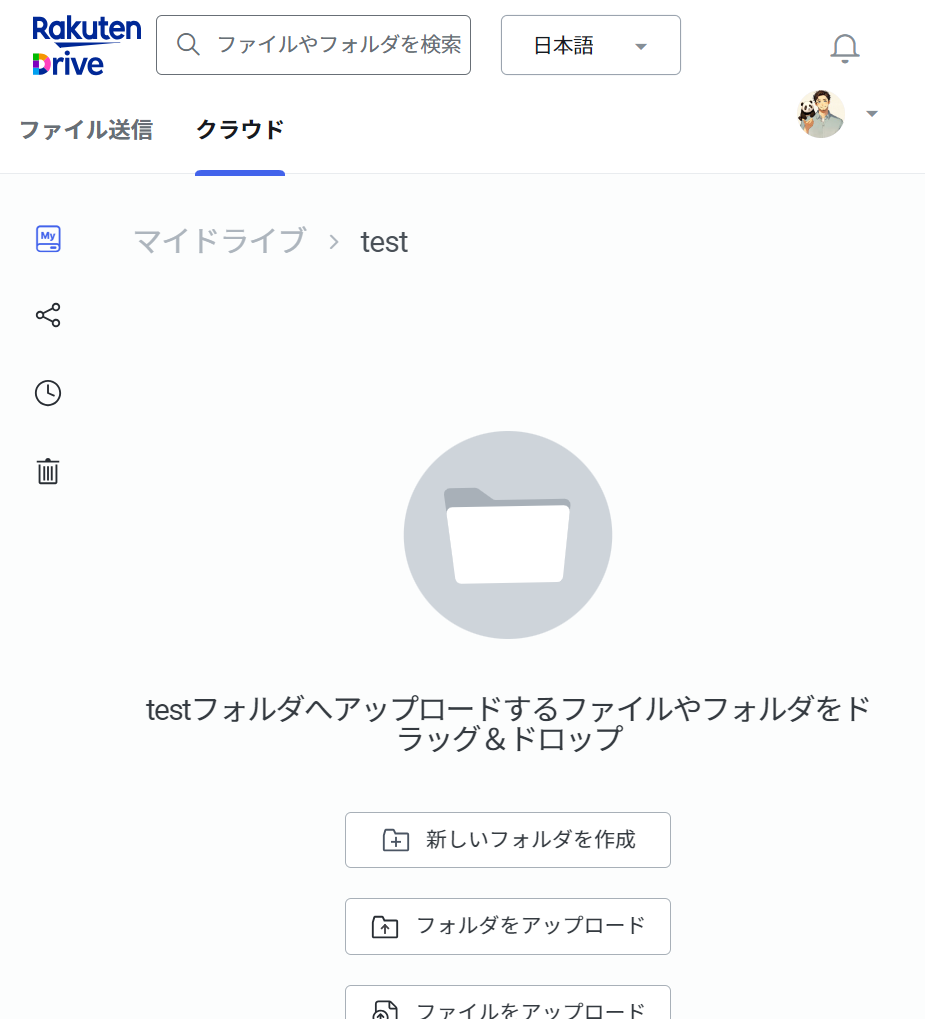
<p>PCの場合、ドラッグアンドドロップでそのままクラウド上にアップが可能です。</p>


<figure class="wp-block-image size-full is-resized is-style-st-photoline"><img decoding="async" width="925" height="1019" src="https://www.rmobile-evangelist.site/wp-content/uploads/2024/07/image-14.png" alt="" class="wp-image-1840" style="width:357px;height:auto" srcset="https://www.rmobile-evangelist.site/wp-content/uploads/2024/07/image-14.png 925w, https://www.rmobile-evangelist.site/wp-content/uploads/2024/07/image-14-272x300.png 272w, https://www.rmobile-evangelist.site/wp-content/uploads/2024/07/image-14-768x846.png 768w" sizes="(max-width: 925px) 100vw, 925px" /></figure>


<p>直感的に操作できるので、初めて使う人も問題なく利用できると思います。</p>


<p>アプリの場合、以下の手順でファイルをクラウド上に保存することが可能です。</p>


<ol class="wp-block-list">
<li>「<strong>ホーム</strong>」ボタンから、アップしたいファイルを選択</li>


<li>「<strong>アップロード</strong>」ボタンを押す</li>


<li>アップロード先のフォルダを指定する</li>


<li>「<strong>アップロード</strong>」ボタンを押す</li>
</ol>


<p class="is-style-st-paragraph-kaiwa">個人的には、アップまでの工程はPCでの作業の方がラクで好きですね</p>


<h3 class="wp-block-heading">RakutenDrive(楽天ドライブ)の保存ファイルの転送方法</h3>


<p>楽天ドライブ上に保存したファイルは、他の人にもリンクを送信して共有が可能です。</p>


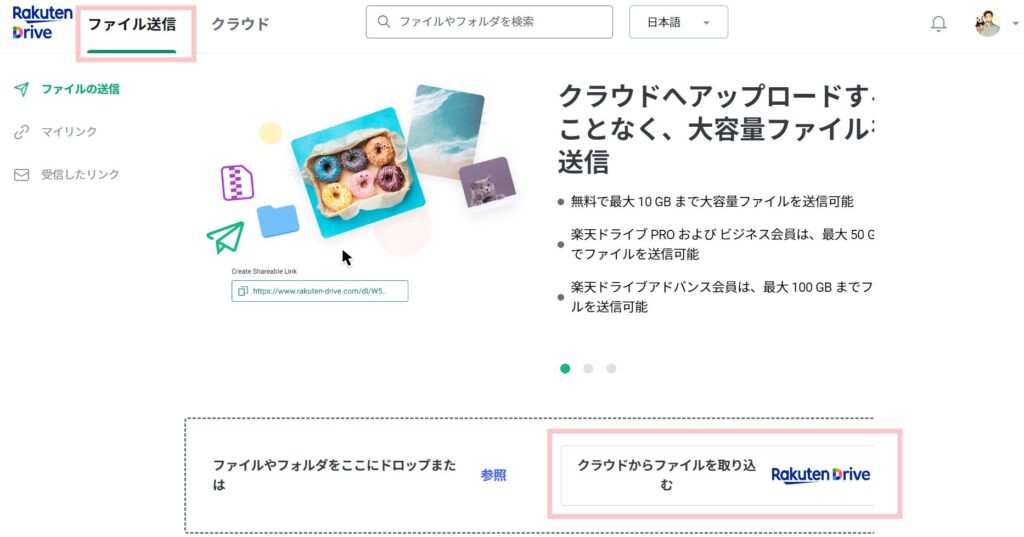
<p>PC上での操作方法は以下の通りです。</p>


<ol class="wp-block-list">
<li>「<strong>ファイル送信</strong>」のタブを押す</li>


<li>「<strong>ファイルやフォルダをここにドロップまたは参照</strong>」か「<strong>クラウドからファイルを取り込む</strong>」を押す</li>


<li>クラウド上に保存しているファイルを送る場合、フォルダかファイルを選択</li>
</ol>


<figure class="wp-block-image size-large is-resized is-style-st-photoline"><img decoding="async" width="1024" height="537" src="https://www.rmobile-evangelist.site/wp-content/uploads/2024/07/ファイル送信-669c4dd6189de-1024x537.jpg" alt="" class="wp-image-1845" style="width:774px;height:auto" srcset="https://www.rmobile-evangelist.site/wp-content/uploads/2024/07/ファイル送信-669c4dd6189de-1024x537.jpg 1024w, https://www.rmobile-evangelist.site/wp-content/uploads/2024/07/ファイル送信-669c4dd6189de-300x157.jpg 300w, https://www.rmobile-evangelist.site/wp-content/uploads/2024/07/ファイル送信-669c4dd6189de-768x403.jpg 768w, https://www.rmobile-evangelist.site/wp-content/uploads/2024/07/ファイル送信-669c4dd6189de-1536x806.jpg 1536w, https://www.rmobile-evangelist.site/wp-content/uploads/2024/07/ファイル送信-669c4dd6189de.jpg 1866w" sizes="(max-width: 1024px) 100vw, 1024px" /></figure>


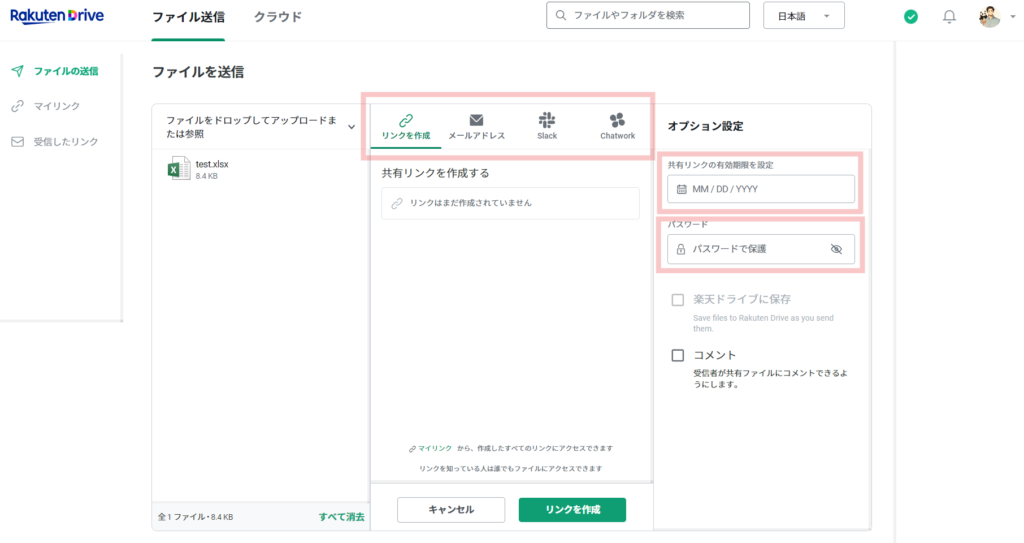
<p>ファイルの送信方法は4通りの中から選択できます。</p>


<ul class="wp-block-list">
<li>リンクを作成して共有</li>


<li>メールアドレスへ送る</li>


<li>Slackで共有</li>


<li>Chatworkで共有</li>
</ul>


<p>今回は、リンクを作成するパターンを紹介します。</p>


<figure class="wp-block-image size-large is-resized is-style-st-photoline"><img decoding="async" width="1024" height="543" src="https://www.rmobile-evangelist.site/wp-content/uploads/2024/07/リンクを作成-1024x543.png" alt="" class="wp-image-1846" style="width:712px;height:auto" srcset="https://www.rmobile-evangelist.site/wp-content/uploads/2024/07/リンクを作成-1024x543.png 1024w, https://www.rmobile-evangelist.site/wp-content/uploads/2024/07/リンクを作成-300x159.png 300w, https://www.rmobile-evangelist.site/wp-content/uploads/2024/07/リンクを作成-768x407.png 768w, https://www.rmobile-evangelist.site/wp-content/uploads/2024/07/リンクを作成-1536x814.png 1536w, https://www.rmobile-evangelist.site/wp-content/uploads/2024/07/リンクを作成.png 1812w" sizes="(max-width: 1024px) 100vw, 1024px" /></figure>


<p><span class="st-mymarker-s">楽天ドライブの共有リンクの有効期限はデフォルトで48時間になっています。</span></p>


<p>有効期限を過ぎたファイルを受信者は閲覧することができません。</p>


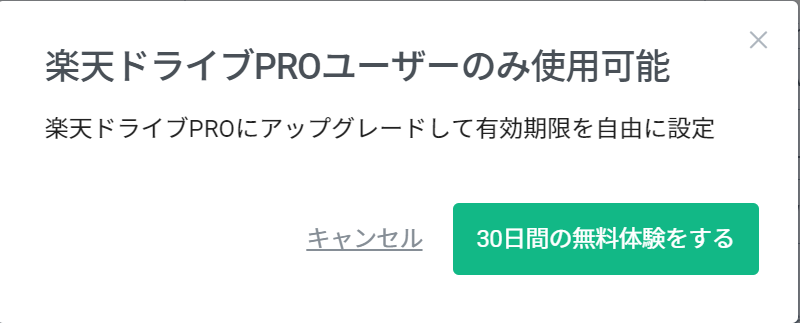
<p>送信者が楽天ドライブPROの契約をしていれば、最大30日間まで有効期限を選択できるようになります。</p>


<figure class="wp-block-image size-full is-resized is-style-st-photoline"><img decoding="async" width="800" height="323" src="https://www.rmobile-evangelist.site/wp-content/uploads/2024/07/image-18.png" alt="" class="wp-image-1848" style="width:639px;height:auto" srcset="https://www.rmobile-evangelist.site/wp-content/uploads/2024/07/image-18.png 800w, https://www.rmobile-evangelist.site/wp-content/uploads/2024/07/image-18-300x121.png 300w, https://www.rmobile-evangelist.site/wp-content/uploads/2024/07/image-18-768x310.png 768w" sizes="(max-width: 800px) 100vw, 800px" /></figure>


<p>また、<span class="st-mymarker-s">無料ユーザーでも送信するファイルにパスワードをかけることが出来ます。</span></p>


<p>リンクを共有しても、パスワードを知っている特定の人のみが閲覧できるようにすることも可能です。</p>


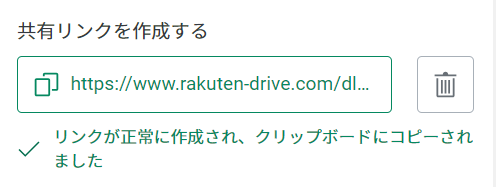
<p>有効期限とパスワードの設定が完了したら、「リンクを作成」ボタンを押してください。</p>


<figure class="wp-block-image size-full is-style-st-photoline"><img decoding="async" width="496" height="187" src="https://www.rmobile-evangelist.site/wp-content/uploads/2024/07/image-17.png" alt="" class="wp-image-1847" srcset="https://www.rmobile-evangelist.site/wp-content/uploads/2024/07/image-17.png 496w, https://www.rmobile-evangelist.site/wp-content/uploads/2024/07/image-17-300x113.png 300w" sizes="(max-width: 496px) 100vw, 496px" /></figure>


<p>リンクはLINEやSNSのDMなどで送付することも可能です。</p>


<h3 class="wp-block-heading">Microsoft 365搭載！RakutenDrive(楽天ドライブ)上でエクエルやWordファイルの編集が可能</h3>


<p>楽天ドライブはMicrosoft365を搭載しています。</p>


<p>クラウド上に保存したファイルは、そのままオンラインで編集が可能です。</p>


<figure class="wp-block-image size-large is-resized is-style-st-photoline"><img decoding="async" width="1024" height="285" src="https://www.rmobile-evangelist.site/wp-content/uploads/2024/07/image-19-1024x285.png" alt="" class="wp-image-1852" style="width:700px;height:auto" srcset="https://www.rmobile-evangelist.site/wp-content/uploads/2024/07/image-19-1024x285.png 1024w, https://www.rmobile-evangelist.site/wp-content/uploads/2024/07/image-19-300x83.png 300w, https://www.rmobile-evangelist.site/wp-content/uploads/2024/07/image-19-768x214.png 768w, https://www.rmobile-evangelist.site/wp-content/uploads/2024/07/image-19-1536x427.png 1536w, https://www.rmobile-evangelist.site/wp-content/uploads/2024/07/image-19.png 1891w" sizes="(max-width: 1024px) 100vw, 1024px" /></figure>


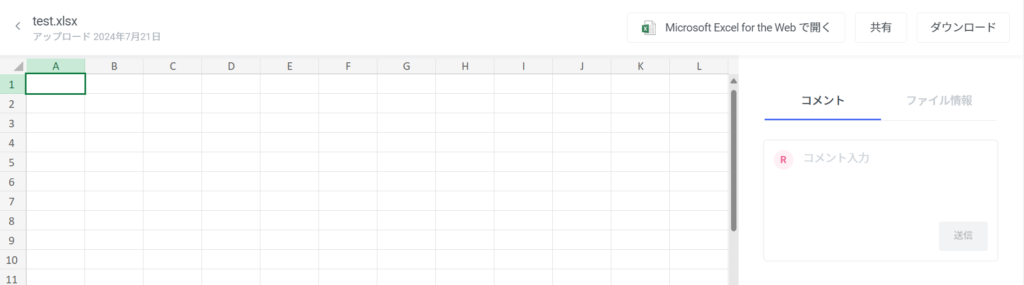
<p>例として、エクセルファイルをクラウド上に保存したあと、そのファイルを開くと右上に「Microsoft Excel for the Webで開く」というボタンが表示されています。</p>


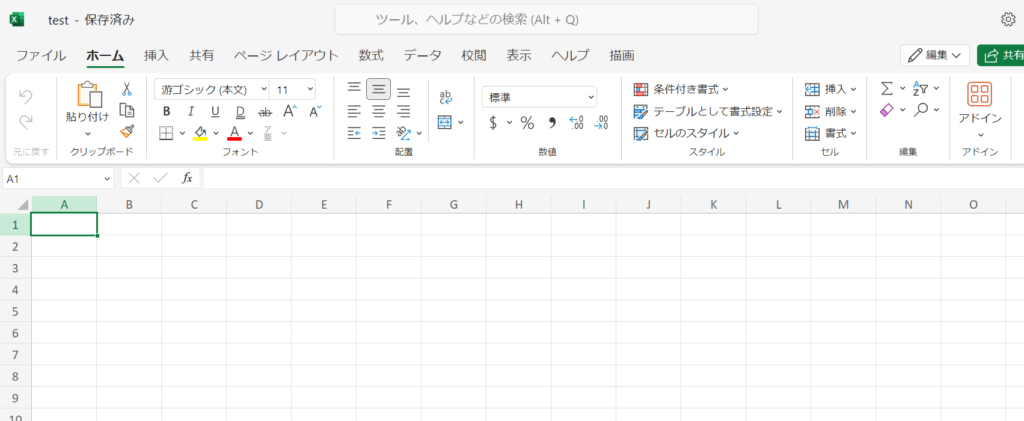
<p>これを押すとエクセルをオンラインで編集することが出来ます。</p>


<figure class="wp-block-image size-large is-resized is-style-st-photoline"><img decoding="async" width="1024" height="421" src="https://www.rmobile-evangelist.site/wp-content/uploads/2024/07/image-20-1024x421.png" alt="" class="wp-image-1853" style="width:680px;height:auto" srcset="https://www.rmobile-evangelist.site/wp-content/uploads/2024/07/image-20-1024x421.png 1024w, https://www.rmobile-evangelist.site/wp-content/uploads/2024/07/image-20-300x123.png 300w, https://www.rmobile-evangelist.site/wp-content/uploads/2024/07/image-20-768x316.png 768w, https://www.rmobile-evangelist.site/wp-content/uploads/2024/07/image-20-1536x631.png 1536w, https://www.rmobile-evangelist.site/wp-content/uploads/2024/07/image-20.png 1703w" sizes="(max-width: 1024px) 100vw, 1024px" /></figure>


<p>オンライン上で編集したファイルは、自動で上書き保存されます。</p>


<h2 class="wp-block-heading">RakutenDrive(楽天ドライブ)を無料で利用する方法を紹介</h2>


<p>楽天ドライブを無料で利用する方法は2つあります。</p>


<p><span class="swl-marker mark_yellow">楽天モバイルの「<span class="hutoaka"><strong><span class="swl-inline-color has-swl-main-color">Rakuten最強プラン</span></strong></span>」を契約中か、未契約かで無料特典内容が異なります。</span></p>


<p>それぞれの特典について解説していきます。</p>


<h3 class="wp-block-heading">楽天モバイルの「Rakuten最強プラン」契約者は50GBのストレージが無料で利用可能</h3>


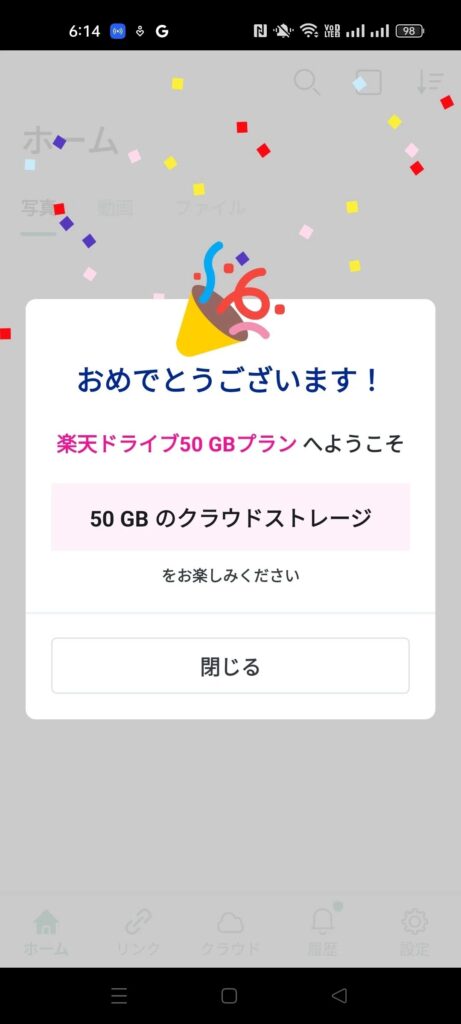
<p>まずは、<span class="st-mymarker-s">「Rakuten最強プラン」を契約中の方</span>は、そのまま楽天ドライブにログインするだけで<strong>50GBのストレージを無料</strong>で利用することが可能です。</p>


<p>特に何もする必要はないため、「Rakuten最強プラン」を利用中の楽天アカウントで<a href="https://home.rakuten-drive.com/?lang=ja" target="_blank" rel="noopener nofollow" title="ログイン">ログイン</a>してください。</p>


<figure class="wp-block-image size-large is-resized is-style-st-photoline"><img decoding="async" width="461" height="1024" src="https://www.rmobile-evangelist.site/wp-content/uploads/2024/07/image-21-461x1024.jpg" alt="" class="wp-image-1855" style="width:486px;height:auto" srcset="https://www.rmobile-evangelist.site/wp-content/uploads/2024/07/image-21-461x1024.jpg 461w, https://www.rmobile-evangelist.site/wp-content/uploads/2024/07/image-21-135x300.jpg 135w, https://www.rmobile-evangelist.site/wp-content/uploads/2024/07/image-21-768x1707.jpg 768w, https://www.rmobile-evangelist.site/wp-content/uploads/2024/07/image-21-691x1536.jpg 691w, https://www.rmobile-evangelist.site/wp-content/uploads/2024/07/image-21-922x2048.jpg 922w, https://www.rmobile-evangelist.site/wp-content/uploads/2024/07/image-21.jpg 1080w" sizes="(max-width: 461px) 100vw, 461px" /></figure>


<p>同じクラウドのストレージサービスのiCloudだと、<span class="hutoaka">50GBは月額130円（税込）</span>かかります。</p>


<p><span class="st-mymarker-s">そのため楽天ドライブを1年間無料で利用した場合、年間1,560円分の節約効果があります</span>。</p>


<h3 class="wp-block-heading">楽天モバイルの「Rakuten最強プラン」未契約の方は、最大10GBのストレージを無料で利用可能</h3>


<p><span class="st-mymarker-s">「Rakuten最強プラン」未契約の人</span>は、<strong>最大10GB</strong>まで無料でストレージを無料で利用できます。</p>


<p id="9bac6edc-c34c-4b22-b9b7-b43793a688e7">以下のチュートリアルチャレンジを達成することで、最大10GB分のストレージを無料にすることが可能です。</p>


<div class="swell-block-capbox cap_box is-style-onborder_ttl2"><div class="cap_box_ttl"><span>チュートリアル</span></div><div class="cap_box_content">
<ul id="82a6b5a4-f47d-4418-8563-c260a330592e" class="wp-block-list">
<li>メールアドレス認証：4GBゲット</li>


<li>プロフィール情報を編集する：2GBゲット</li>


<li>クラウドからフォルダを共有する：1GBゲット</li>


<li>共有リンクでファイルを転送する：2GBゲット</li>
</ul>
</div></div>


<p class="is-style-st-paragraph-kaiwa" id="4c206ed0-e89f-4ee5-b873-ca6cd2600182">チュートリアル自体はそんなに難しい課題ではないので、誰でも簡単に10GB分をゲットできると思います。</p>


<p id="ad998b7f-e5de-4ce3-bf91-d75e7ebdd8c1">やり方がわからない人は<a href="https://support.rakuten-drive.com/hc/ja/articles/30987954831769-%E3%82%AF%E3%83%A9%E3%82%A6%E3%83%89%E3%82%B9%E3%83%88%E3%83%AC%E3%83%BC%E3%82%B8%E5%AE%B9%E9%87%8F%E3%82%92%E5%A2%97%E3%82%84%E3%81%99#:~:text=%E3%81%99%E3%82%8B%EF%BC%9A2GB%E3%82%B2%E3%83%83%E3%83%88-,%E3%83%81%E3%83%A5%E3%83%BC%E3%83%88%E3%83%AA%E3%82%A2%E3%83%AB%E3%83%81%E3%83%A3%E3%83%AC%E3%83%B3%E3%82%B8%E3%82%92%E9%81%94%E6%88%90%E3%81%99%E3%82%8B%E6%96%B9%E6%B3%95,-1.%20rakuten%2Ddrive" target="_blank" rel="noopener nofollow" title="" class="broken_link">こちら</a>を参考にしてみてください。</p>


<h2 class="wp-block-heading">RakutenDrive(楽天ドライブ)の有料プランの料金はいくら？30日間無料体験あり</h2>


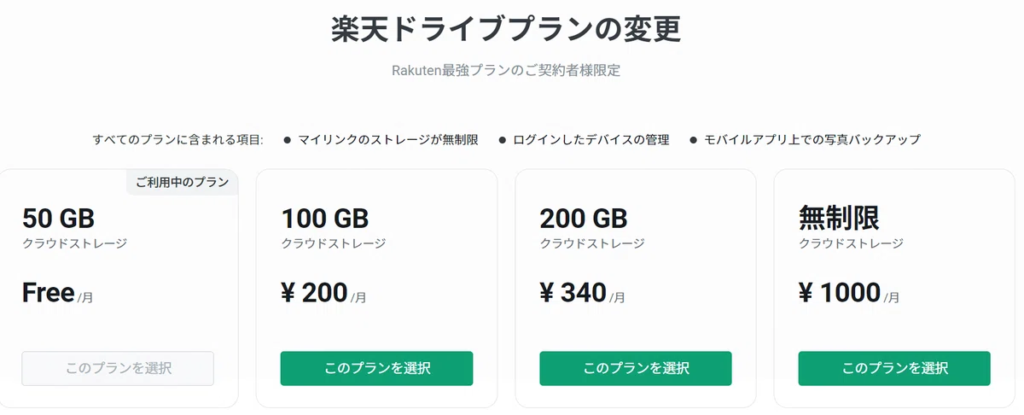
<p>「Rakuten最強プラン」を契約中の方は、楽天ドライブの有料プランを以下の料金で利用可能です。</p>


<figure class="wp-block-image size-large is-style-st-photoline"><img decoding="async" width="1024" height="415" src="https://www.rmobile-evangelist.site/wp-content/uploads/2024/07/image-21-1024x415.png" alt="" class="wp-image-1862" srcset="https://www.rmobile-evangelist.site/wp-content/uploads/2024/07/image-21-1024x415.png 1024w, https://www.rmobile-evangelist.site/wp-content/uploads/2024/07/image-21-300x122.png 300w, https://www.rmobile-evangelist.site/wp-content/uploads/2024/07/image-21-768x311.png 768w, https://www.rmobile-evangelist.site/wp-content/uploads/2024/07/image-21.png 1200w" sizes="(max-width: 1024px) 100vw, 1024px" /></figure>


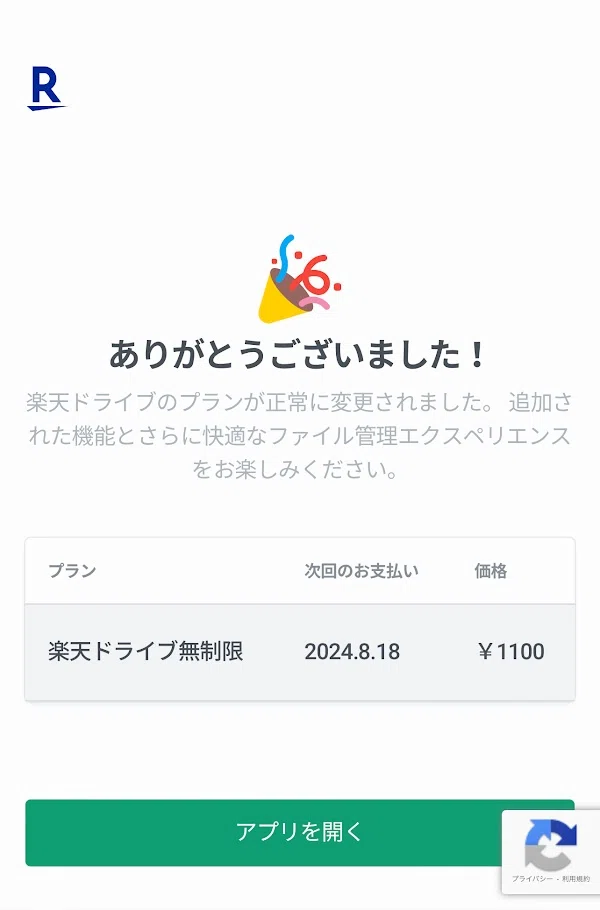
<p class="is-style-bg_stripe">・<strong>100GB</strong>のクラウドストレージ：月額220円（税込）<br>・<strong>200GB</strong>のクラウドストレージ：月額370円（税込）<br>・<strong>無制限</strong>のクラウドストレージ：月額1,100円（税込）</p>


<p>私は<strong>月額1,100円(税込)</strong>の<strong>無制限</strong>プランを選択しました。</p>


<p>ブログで利用する画像や動画ファイルなど、容量を気にせず保管しておきたいのでこちらを利用してみました。</p>


<figure class="wp-block-image size-full is-resized is-style-st-photoline"><img decoding="async" width="600" height="910" src="https://www.rmobile-evangelist.site/wp-content/uploads/2024/07/image-22.png" alt="" class="wp-image-1865" style="width:330px;height:auto" srcset="https://www.rmobile-evangelist.site/wp-content/uploads/2024/07/image-22.png 600w, https://www.rmobile-evangelist.site/wp-content/uploads/2024/07/image-22-198x300.png 198w" sizes="(max-width: 600px) 100vw, 600px" /></figure>


<p>なお、今なら、初回30日間無料体験を実施しています。</p>


<p>無料体験期間中にいろいろと試してみるのはいかがでしょうか。</p>


<figure class="wp-block-image size-large is-style-st-photoline"><img decoding="async" width="1024" height="194" src="https://www.rmobile-evangelist.site/wp-content/uploads/2024/07/image-24-1024x194.png" alt="" class="wp-image-1872" srcset="https://www.rmobile-evangelist.site/wp-content/uploads/2024/07/image-24-1024x194.png 1024w, https://www.rmobile-evangelist.site/wp-content/uploads/2024/07/image-24-300x57.png 300w, https://www.rmobile-evangelist.site/wp-content/uploads/2024/07/image-24-768x145.png 768w, https://www.rmobile-evangelist.site/wp-content/uploads/2024/07/image-24.png 1090w" sizes="(max-width: 1024px) 100vw, 1024px" /></figure>


<h3 class="wp-block-heading">楽天ドライブの有料プランの支払い方法</h3>


<p id="fc0245c9-9a61-4d97-985a-10b41704d205"><a href="https://home.rakuten-drive.com/?lang=ja" target="_blank" rel="noopener nofollow" title="rakuten-drive.com">rakuten-drive.com</a>から楽天ドライブの有料プランを購入する場合、<strong>クレジットカードまたは、デビットカード</strong>による日本円での支払いです。（24年7月現在）</p>


<p id="0dec4eb5-7607-4856-b6a0-6552862abfbf">利用できる国際ブランドは以下の通りです。</p>


<div class="swell-block-capbox cap_box is-style-onborder_ttl2"><div class="cap_box_ttl"><span>国際ブランド</span></div><div class="cap_box_content">
<ul id="1b78603e-6e39-4cbe-8c8f-8d701c5701ec" class="wp-block-list">
<li><strong>Visa</strong></li>


<li><strong>Mastercard</strong></li>


<li><strong>American Express</strong></li>


<li><strong>JCB</strong></li>
</ul>
</div></div>


<p id="b91fdfdf-c090-4e57-b4b0-cf6d42a3b131">また、<strong>iOS</strong>の楽天ドライブアプリ内で決済する場合、Apple IDで使える支払方法で決済出来ます。</p>


<h2 class="wp-block-heading">【朗報】楽天ドライブWeb版のファイルアップロード制限撤廃！24年9月24日から</h2>


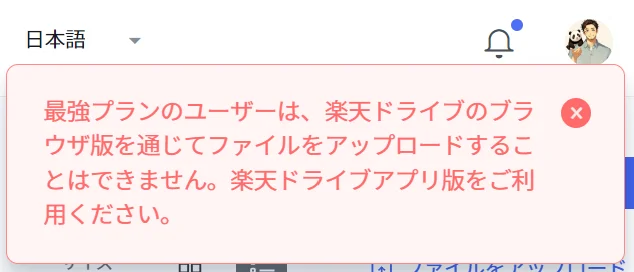
<p>実は24年9月23日まで、楽天ドライブのサーバーへの負荷を考慮して、一時的にウェブ版でのアップロードができない制限を設けていました。</p>


<figure class="wp-block-image size-full is-style-st-photoline"><img decoding="async" width="634" height="272" src="https://www.rmobile-evangelist.site/wp-content/uploads/2024/07/image-26.png" alt="" class="wp-image-2236" srcset="https://www.rmobile-evangelist.site/wp-content/uploads/2024/07/image-26.png 634w, https://www.rmobile-evangelist.site/wp-content/uploads/2024/07/image-26-300x129.png 300w" sizes="(max-width: 634px) 100vw, 634px" /></figure>


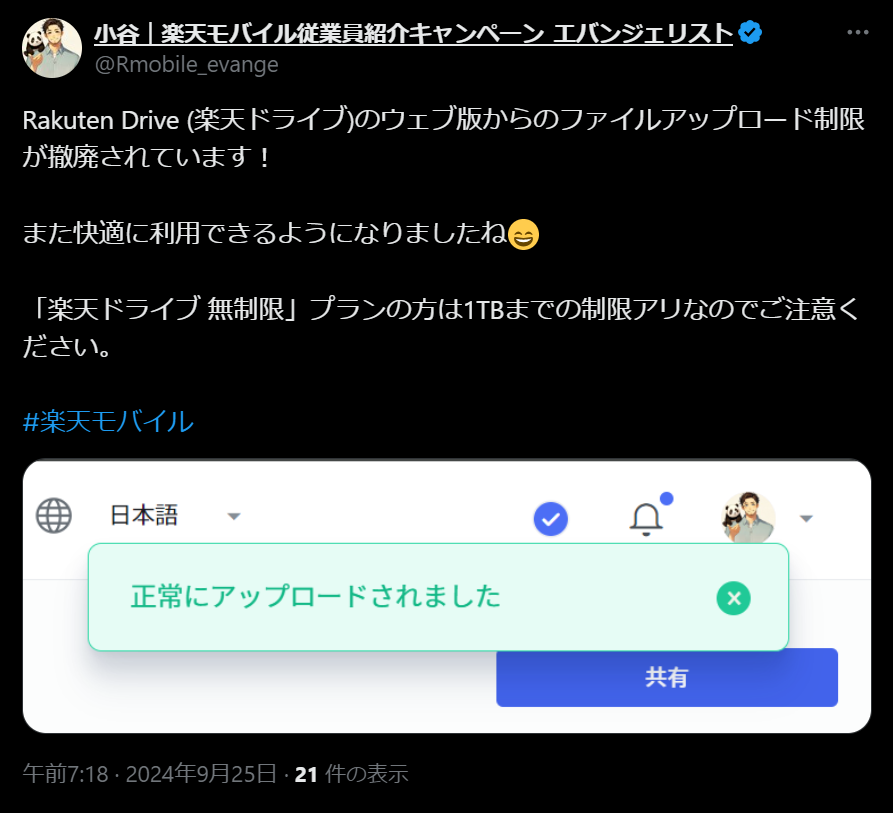
<p>ですが2024年9月24日（火）15時以降、すべてのプランにおける本制限が撤廃されています。</p>


<p>私も、9月25日に試したところ制限がなくなっていることを確認しました。</p>


<figure class="wp-block-image size-full is-style-st-photoline"><img decoding="async" width="893" height="813" src="https://www.rmobile-evangelist.site/wp-content/uploads/2024/07/image-27.png" alt="" class="wp-image-2237" srcset="https://www.rmobile-evangelist.site/wp-content/uploads/2024/07/image-27.png 893w, https://www.rmobile-evangelist.site/wp-content/uploads/2024/07/image-27-300x273.png 300w, https://www.rmobile-evangelist.site/wp-content/uploads/2024/07/image-27-768x699.png 768w" sizes="(max-width: 893px) 100vw, 893px" /></figure>


<h3 class="wp-block-heading">【楽天ドライブ】無制限プラン利用者はアップロードが1TBを超えたら制限アリ｜9/24～</h3>


<p>なお、この制限撤廃に伴い一部条件の変更点があります。</p>


<p>「<strong>楽天ドライブ 無制限</strong>」プランでは、データアップロード容量が&nbsp;<strong>1TB に達したユーザー</strong>を対象に、ブラウザ版でのデータアップロード機能に制限を設ける予定とのことです。</p>


<p><span class="st-mymarker-s-b">つまり、アップロードするデータ容量が1TBを超えてからは、楽天ドライブのアプリからしかデータのアップロードができなくなる制限が加わります。</span></p>


<p>大量にデータをアップする予定がある人は、この点に留意してください。</p>


<h2 class="wp-block-heading">楽天モバイル従業員紹介キャンペーンでお得に申し込もう！</h2>


<div class="wp-block-image">
<figure class="aligncenter size-large is-resized"><img decoding="async" width="1024" height="1024" src="https://www.rmobile-evangelist.site/wp-content/uploads/2024/11/12月SNSバナー-1024x1024.jpg" alt="" class="wp-image-2947" style="width:799px;height:auto" srcset="https://www.rmobile-evangelist.site/wp-content/uploads/2024/11/12月SNSバナー-1024x1024.jpg 1024w, https://www.rmobile-evangelist.site/wp-content/uploads/2024/11/12月SNSバナー-300x300.jpg 300w, https://www.rmobile-evangelist.site/wp-content/uploads/2024/11/12月SNSバナー-150x150.jpg 150w, https://www.rmobile-evangelist.site/wp-content/uploads/2024/11/12月SNSバナー-768x768.jpg 768w, https://www.rmobile-evangelist.site/wp-content/uploads/2024/11/12月SNSバナー-100x100.jpg 100w, https://www.rmobile-evangelist.site/wp-content/uploads/2024/11/12月SNSバナー.jpg 1080w" sizes="(max-width: 1024px) 100vw, 1024px" /></figure></div>


<p>最後に、これから楽天モバイルの契約を検討している人には、楽天モバイルをお得に申し込みできるキャンペーンを紹介します。</p>


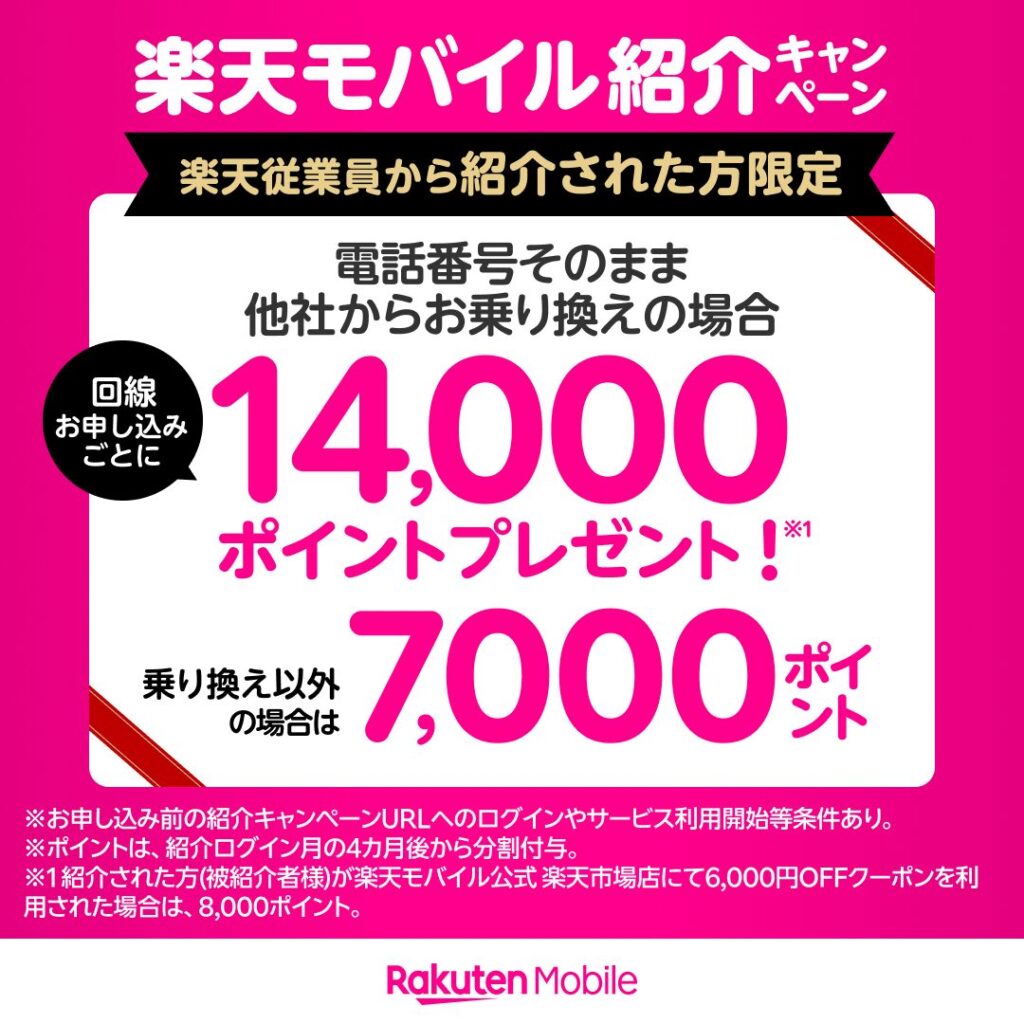
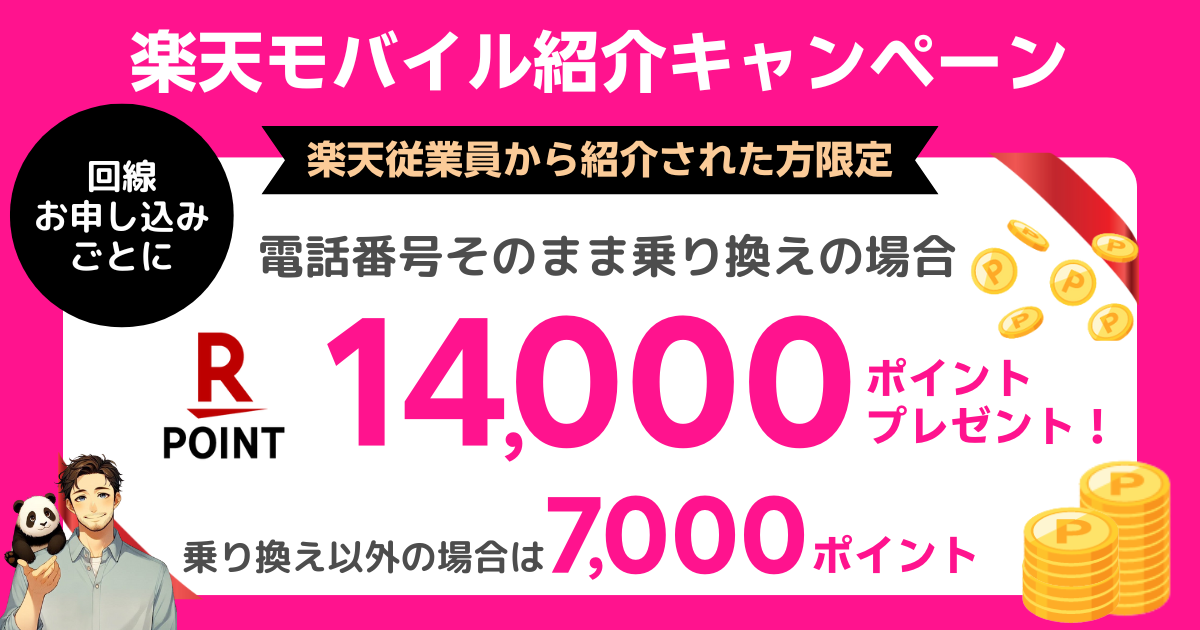
<p>楽天モバイルでは、楽天従業員による紹介キャンペーンを実施しています。</p>


<p><span class="swl-marker mark_yellow">当キャンペーン参加で、1回線につき<strong>最大14,000P</strong>をプレゼントしています。</span></p>


<div class="swell-block-capbox cap_box is-style-onborder_ttl2"><div class="cap_box_ttl"><span>キャンペーン概要</span></div><div class="cap_box_content">
<ul class="wp-block-list is-style-good_list">
<li>他社回線から楽天モバイルへ乗り換えで<strong><span class="swl-inline-color has-swl-main-color">14,000P</span></strong>還元</li>


<li>新規回線契約など乗り換え以外で<strong><span class="swl-inline-color has-swl-main-color">7,000P</span></strong>還元</li>


<li><strong><span class="swl-inline-color has-swl-main-color">再契約</span></strong>や<strong><span class="swl-inline-color has-swl-main-color">追加回線契約</span></strong>も対象</li>


<li><strong><span class="swl-inline-color has-swl-main-color">1人5回</span></strong>まで利用可能</li>


<li><strong><span class="swl-inline-color has-swl-main-color">データタイプ</span></strong>や<strong><span class="swl-inline-color has-swl-main-color">Rakuten Turbo</span></strong>も対象</li>


<li>RakutenLinkアプリでの<strong><span class="swl-inline-color has-swl-main-color">通話不要</span></strong></li>


<li><strong><span class="swl-inline-color has-swl-main-color">事前エントリー</span></strong>必須</li>
</ul>
</div></div>


<p><span class="swl-marker mark_yellow">本キャンペーン参加は、楽天従業員の<strong>専用紹介リンクからエントリー</strong>してください。</span></p>


<div class="wp-block-group"><div class="wp-block-group__inner-container is-layout-constrained wp-block-group-is-layout-constrained">
<div class="swell-block-step is-style-small" data-num-style="circle">
<div class="swell-block-step__item"><div class="swell-block-step__number"><span class="__shape u-col-main" role="presentation"></span><span class="__label">STEP</span></div><div class="swell-block-step__title u-fz-m">専用リンクをタップするかQRコードを読み取る</div><div class="swell-block-step__body">
<div class="swell-block-button is-style-btn_shiny"><a href="https://bit.ly/42VTtMg" target="_blank" rel="noopener noreferrer" class="swell-block-button__link"><span>エントリーする</span></a></div>


<div class="wp-block-image">
<figure class="aligncenter size-full is-resized"><img decoding="async" width="240" height="296" src="https://www.rmobile-evangelist.site/wp-content/uploads/2024/06/undefined-2.png" alt="" class="wp-image-3022" style="width:140px;height:auto"/></figure></div></div></div>


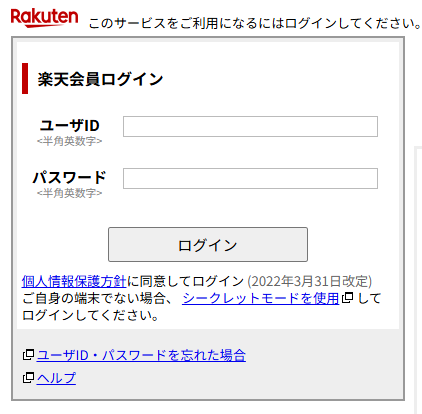
<div class="swell-block-step__item"><div class="swell-block-step__number"><span class="__shape u-col-main" role="presentation"></span><span class="__label">STEP</span></div><div class="swell-block-step__title u-fz-m">楽天会員ログインする</div><div class="swell-block-step__body">
<p>楽天モバイルを契約する方の楽天会員情報でログインしてください。</p>


<div class="wp-block-image">
<figure class="aligncenter size-full is-resized"><img decoding="async" width="422" height="414" src="https://www.rmobile-evangelist.site/wp-content/uploads/2024/06/image-31.png" alt="" class="wp-image-3032" style="width:295px;height:auto" srcset="https://www.rmobile-evangelist.site/wp-content/uploads/2024/06/image-31.png 422w, https://www.rmobile-evangelist.site/wp-content/uploads/2024/06/image-31-300x294.png 300w" sizes="(max-width: 422px) 100vw, 422px" /></figure></div></div></div>


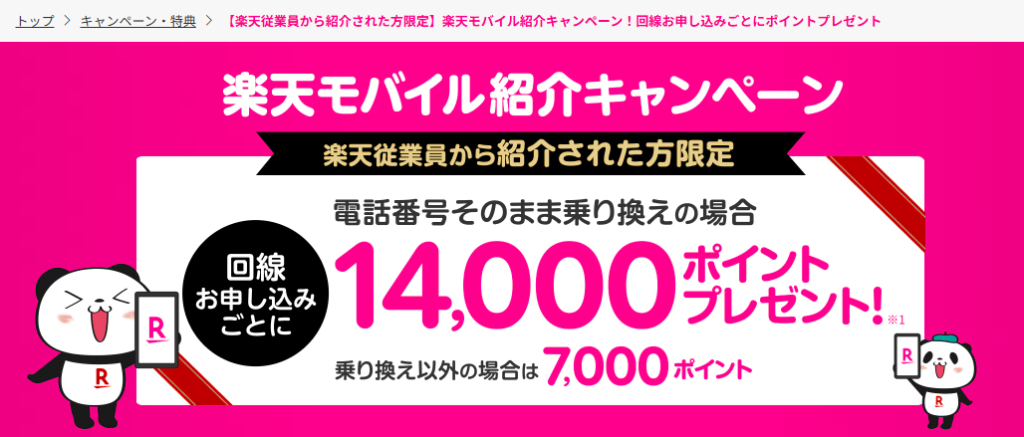
<div class="swell-block-step__item"><div class="swell-block-step__number"><span class="__shape u-col-main" role="presentation"></span><span class="__label">STEP</span></div><div class="swell-block-step__title u-fz-m"><br>キャンペーンページが表示されたらエントリー完了</div><div class="swell-block-step__body">
<p>以下のようなキャンペーンページが表示されたらエントリー完了です。「エントリー完了」のような表示はでてきませんが、ご安心ください。</p>


<div class="wp-block-image">
<figure class="aligncenter size-large is-resized"><img decoding="async" width="1024" height="437" src="https://www.rmobile-evangelist.site/wp-content/uploads/2024/06/image-32-1024x437.png" alt="" class="wp-image-3033" style="width:403px;height:auto" srcset="https://www.rmobile-evangelist.site/wp-content/uploads/2024/06/image-32-1024x437.png 1024w, https://www.rmobile-evangelist.site/wp-content/uploads/2024/06/image-32-300x128.png 300w, https://www.rmobile-evangelist.site/wp-content/uploads/2024/06/image-32-768x328.png 768w, https://www.rmobile-evangelist.site/wp-content/uploads/2024/06/image-32.png 1028w" sizes="(max-width: 1024px) 100vw, 1024px" /></figure></div></div></div>


<div class="swell-block-step__item"><div class="swell-block-step__number"><span class="__shape u-col-main" role="presentation"></span><span class="__label">STEP</span></div><div class="swell-block-step__title u-fz-m">翌々月末日までに楽天モバイルの申し込み・利用開始完了</div><div class="swell-block-step__body">
<p>エントリーには有効期限があります。</p>


<p>「翌々月末日」までに楽天モバイルの申し込みと利用を開始するようにしてください。有効期限が過ぎた場合は、再度エントリーすればOKです。</p>
</div></div>
</div>
</div></div>


<p>本キャンペーンに関する詳しい情報は、以下の記事で解説しているので参考にしてみてください。</p>


<p class="has-text-align-center animated bounce u-mb-ctrl u-mb-5"><strong><span class="swl-inline-color has-swl-main-color">＼ 楽天モバイル従業員紹介キャンペーンを解説 ／</span></strong></p>


<div class="swell-block-postLink">			<div class="p-blogCard -external" data-type="type2" data-onclick="clickLink">
				<div class="p-blogCard__inner">
					<span class="p-blogCard__caption">楽天モバイル従業員紹介キャンペー&#8230;</span>
					<div class="p-blogCard__thumb c-postThumb"><figure class="c-postThumb__figure"><img decoding="async" src="https://www.rmobile-evangelist.site/wp-content/uploads/2025/07/affingerアイキャッチ-37.png" alt="" class="c-postThumb__img u-obf-cover" width="320" height="180"></figure></div>					<div class="p-blogCard__body">
						<a class="p-blogCard__title" href="https://www.rmobile-evangelist.site/rakutenmobile_employee_referral" target="_blank" rel="noopener noreferrer">2025年最新｜楽天モバイル従業員紹介キャンペーンとは？お得な申込方法を徹底解説！</a>
						<span class="p-blogCard__excerpt">楽天モバイルの申し込みは、楽天社員紹介リンクを使ってお申し込み頂くと、1回線あたり最大14,000ポイントを進呈しています。再契約や2回線、3回線目と複数回線のご契約も&#8230;</span>					</div>
				</div>
			</div>
		</div>


<h2 class="wp-block-heading">まとめ｜楽天ドライブを実際に利用してみた感想</h2>


<p>今回は楽天ドライブの利用方法や、お得に利用する方法を解説しました。</p>


<p>「Rakuten最強プラン」を契約中だったので、50GBのストレージが無料で利用できるこの機会に利用を開始しましたが、使い勝手は悪くないです。</p>


<p>有料プランではありますが、ストレージの容量を気にせず作業できるのもGoodポイントです。</p>


<p>イマイチなポイントがあるとすれば、クラウド上に保存したファイルのアイコンが小さいので、画像が分かりづらいという点でしょうか・・・</p>


<p>このように、PC画面で見た時にアイコンが小さいです。</p>


<figure class="wp-block-image size-large is-style-st-photoline"><img decoding="async" width="1024" height="228" src="https://www.rmobile-evangelist.site/wp-content/uploads/2024/07/image-23-1024x228.png" alt="" class="wp-image-1866" srcset="https://www.rmobile-evangelist.site/wp-content/uploads/2024/07/image-23-1024x228.png 1024w, https://www.rmobile-evangelist.site/wp-content/uploads/2024/07/image-23-300x67.png 300w, https://www.rmobile-evangelist.site/wp-content/uploads/2024/07/image-23-768x171.png 768w, https://www.rmobile-evangelist.site/wp-content/uploads/2024/07/image-23.png 1212w" sizes="(max-width: 1024px) 100vw, 1024px" /></figure>


<p>一つずつファイル名をつけていれば問題ないでしょうが、すべてのファイルに名前をつけて保存するのは面倒でしょう。</p>


<p>アイコンが小さい点については、UIが改善されるのを待ちましょう・・・</p>


<a href="https://mobile.blogmura.com/ranking/in?p_cid=11188095" target="_blank" rel="noopener"><img decoding="async" src="https://b.blogmura.com/mobile/88_31.gif" width="88" height="31" border="0" alt="にほんブログ村 スマホ・携帯ブログへ" /></a><br /><a href="https://mobile.blogmura.com/ranking/in?p_cid=11188095" target="_blank" rel="noopener">にほんブログ村</a>


]]></content:encoded>
					
					<wfw:commentRss>https://www.rmobile-evangelist.site/rakutendrive/%20/feed</wfw:commentRss>
			<slash:comments>0</slash:comments>
		
		
			</item>
	</channel>
</rss>
<br />
<b>Fatal error</b>:  Uncaught Error: Call to undefined function wp_parse_auth_cookie() in /home/c5498722/public_html/rmobile-evangelist.site/wp-includes/user.php:3632
Stack trace:
#0 /home/c5498722/public_html/rmobile-evangelist.site/wp-content/plugins/microsoft-clarity/clarity-server-analytics.php(58): wp_get_session_token()
#1 /home/c5498722/public_html/rmobile-evangelist.site/wp-content/plugins/microsoft-clarity/clarity-server-analytics.php(35): clarity_construct_collect_event()
#2 /home/c5498722/public_html/rmobile-evangelist.site/wp-includes/class-wp-hook.php(341): clarity_collect_event()
#3 /home/c5498722/public_html/rmobile-evangelist.site/wp-includes/class-wp-hook.php(365): WP_Hook-&gt;apply_filters()
#4 /home/c5498722/public_html/rmobile-evangelist.site/wp-includes/plugin.php(522): WP_Hook-&gt;do_action()
#5 /home/c5498722/public_html/rmobile-evangelist.site/wp-includes/load.php(1308): do_action()
#6 [internal function]: shutdown_action_hook()
#7 {main}
  thrown in <b>/home/c5498722/public_html/rmobile-evangelist.site/wp-includes/user.php</b> on line <b>3632</b><br />